Table of Contents
ToggleSmart home technology isn’t just convenient, it’s becoming the standard for modern living. Homeowners can now control lighting, climate, security, and entertainment from a single device, saving energy and adding layers of safety. But diving into smart home tech without a plan often leads to compatibility headaches and wasted money on devices that don’t talk to each other. This guide walks through the practical steps to build a smart home system that works reliably, integrates smoothly, and grows with changing needs.
Key Takeaways
- Making a smart home requires planning your strategy first by identifying priorities, assessing Wi-Fi coverage, and choosing a primary control ecosystem like Amazon Alexa, Google Home, or Apple HomeKit.
- Start with essential smart home devices like smart lighting, thermostats, locks, and video doorbells that deliver immediate value and energy savings of 10-23% for heating and cooling costs.
- Set up a central hub with proper network security by using a strong password, enabling two-factor authentication, and isolating smart devices on a separate Wi-Fi network.
- Automate your smart home gradually using time-based, location-based, and sensor-driven routines that work together seamlessly rather than controlling devices individually.
- Verify device compatibility with your chosen ecosystem and electrical infrastructure before purchasing to avoid integration headaches and ensure your system grows reliably over time.
What Is a Smart Home and Why Should You Make the Switch?
A smart home uses internet-connected devices to automate and remotely control household systems, lighting, heating and cooling, locks, cameras, appliances, and more. These devices communicate through a central hub or mesh network, responding to schedules, voice commands, or sensor triggers.
The benefits go beyond novelty. Smart thermostats learn occupancy patterns and adjust temperature automatically, cutting HVAC costs by 10-23% according to EPA estimates. Smart lighting reduces electricity waste by turning off lights in empty rooms. Security systems send real-time alerts when motion is detected or doors open unexpectedly. For homeowners managing rental properties or aging parents, remote monitoring offers peace of mind without constant check-ins.
Smart homes also add resale value. Buyers increasingly expect connected features, particularly in newer construction. But, poorly integrated systems, mismatched protocols, abandoned app ecosystems, or devices that require separate hubs, can frustrate users and reduce adoption. Planning the ecosystem upfront avoids these pitfalls.
Plan Your Smart Home Strategy Before You Buy
Jumping straight to product reviews wastes time and money. Start by identifying which systems matter most. Does the household prioritize energy savings, security, convenience, or entertainment? Rank needs by importance, this helps allocate budget and prevents impulse buys.
Next, assess the home’s infrastructure. Smart devices require stable Wi-Fi coverage in every room. Run a speed test in far corners: if signal drops below 10 Mbps, consider adding a mesh router system like Eero or Google Nest Wifi before installing devices. Older homes with thick plaster walls or metal lath may need multiple access points.
Choose a control ecosystem early. The big three platforms, Amazon Alexa, Google Home, and Apple HomeKit, each have strengths. Alexa offers the widest device compatibility and third-party integrations. Google Home excels at natural language processing and integrates tightly with Google services. HomeKit prioritizes privacy and works seamlessly with iPhones and iPads but supports fewer devices. Mixing ecosystems is possible but adds complexity. Pick one as the primary platform and verify that each device supports it before purchasing.
Electrical capacity matters for hardwired devices. Smart switches, ceiling fan controllers, and wired cameras draw minimal power individually, but adding a dozen devices to an older circuit can trip breakers. If planning extensive automation, consider having an electrician evaluate the panel. This is especially important in homes built before 1990.
Many homeowners overlook device automation strategies that optimize how systems interact, which saves time and reduces frustration later.
Start with Essential Smart Home Devices
Begin with high-impact, affordable devices that deliver immediate value. These foundational products establish the control ecosystem and prove the concept before investing in more expensive systems.
Smart Lighting and Thermostats
Smart bulbs are the easiest entry point. Philips Hue, LIFX, and Wyze bulbs screw into standard sockets and connect via Wi-Fi or Zigbee. They dim, change color temperature, and schedule on/off times, useful for simulating occupancy when traveling. A starter pack with four bulbs and a hub runs $80-120.
For whole-room control without changing bulbs, install smart switches. These replace standard light switches and work with existing fixtures. Lutron Caséta and Leviton Decora are reliable options. Installation requires basic electrical knowledge: turn off the breaker, remove the old switch, connect hot (black), neutral (white), and ground (green or bare copper) wires to the corresponding terminals, then secure the switch and restore power. If there’s no neutral wire in the box, common in homes built before the 1980s, choose a switch designed for two-wire installations or hire an electrician to run new wiring.
Smart thermostats pay for themselves through energy savings. The Nest Learning Thermostat and Ecobee SmartThermostat are the market leaders. Both require a C-wire (common wire) for continuous power. Most systems installed after 2000 have one: older furnaces may need an adapter or a new wire run from the HVAC control board. Installation takes 30-45 minutes: label existing wires with the provided stickers, remove the old thermostat, mount the new base plate level, connect wires to matching terminals, snap on the display, and follow the app setup. If the system uses a heat pump, boiler, or multi-stage HVAC, verify compatibility before purchasing.
Understanding the range of essential connected devices helps prioritize purchases based on household routines and energy usage patterns.
Smart Security and Doorbells
Security devices offer tangible safety benefits and are among the most popular smart home upgrades. Smart locks eliminate the need for physical keys and allow temporary access codes for contractors or guests. August, Yale, and Schlage make retrofit models that attach to existing deadbolts, preserving the exterior appearance, important in HOA-restricted neighborhoods. Installation involves removing the interior thumb turn, mounting the smart lock assembly with screws, and pairing it to the app. Battery-powered models need CR123A or AA batteries replaced every 6-12 months. For higher security, choose locks with built-in alarms that sound if someone attempts forced entry.
Video doorbells like Ring and Nest Hello stream live video to a smartphone when motion is detected or the button is pressed. Hardwired versions connect to existing doorbell wiring (typically 16-24V AC transformer) and provide continuous power. Battery models work where no wiring exists but require recharging every 1-3 months depending on activity. Mount the doorbell at 48 inches above the porch floor for optimal face capture. Angle the camera slightly downward to avoid glare from direct sunlight.
Smart cameras for indoor and outdoor monitoring complete the security layer. Wyze Cam, Blink, and Arlo offer affordable options with cloud storage. Outdoor cameras need weatherproof housings rated IP65 or higher and should be mounted under eaves to protect from direct rain. Run power and Ethernet cables through exterior walls using a ⅝-inch paddle bit: seal holes with silicone caulk to prevent water intrusion and pest entry.
Set Up Your Smart Home Hub and Connectivity
A central hub simplifies device management, especially as the system grows. Hubs fall into two categories: dedicated controllers and smart speakers with hub capability.
Dedicated hubs like Samsung SmartThings or Hubitat Elevation support multiple wireless protocols, Zigbee, Z-Wave, and Wi-Fi, letting devices from different manufacturers communicate. This matters when expanding beyond one brand. Zigbee and Z-Wave devices form mesh networks, where each powered device extends signal range, improving reliability in larger homes.
Smart speakers like Amazon Echo (4th gen and later) and Google Nest Hub include built-in Zigbee radios, eliminating the need for a separate hub for compatible devices. They also serve as voice control interfaces. Place the hub or speaker centrally, away from thick walls and metal appliances that interfere with wireless signals.
Setting up the hub takes 15-30 minutes. Plug it into the router via Ethernet for the most stable connection, download the manufacturer’s app, create an account, and follow the pairing process for each device. Most devices enter pairing mode when powered on for the first time or after a factory reset (usually a long press on a button).
Network security is critical. Change the hub’s default admin password immediately, use a unique passphrase at least 12 characters long. Enable two-factor authentication if available. Create a separate Wi-Fi network (a guest network works) for smart devices to isolate them from computers and phones. This limits exposure if a device is compromised.
Several smart home setup guides emphasize selecting the right hub based on the number of devices and wireless protocols required for full compatibility.
Automate Your Home for Maximum Convenience
Automation transforms a collection of smart devices into a cohesive system. Instead of manually controlling each device, create routines that trigger based on time, location, or sensor input.
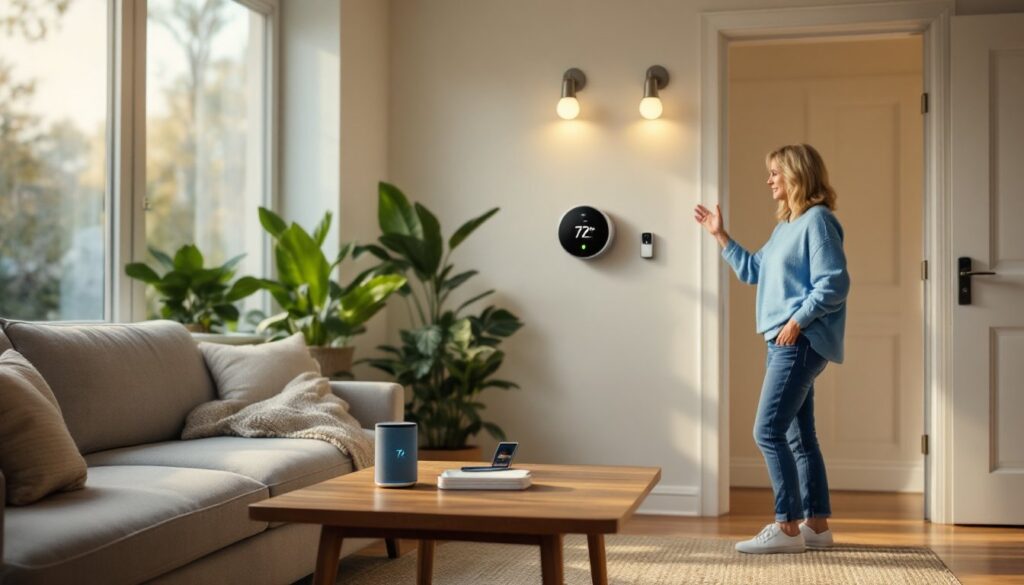
Start with simple time-based routines. A “Good Morning” routine might turn on bedroom lights at 6:30 AM, start the coffee maker, and adjust the thermostat to 70°F. An “Away” routine triggered at 8 AM on weekdays could turn off all lights, lock doors, and set the thermostat to an energy-saving mode.
Location-based automation uses smartphone GPS to trigger actions when someone arrives or leaves. The system can unlock the front door and turn on the entryway lights when a family member’s phone enters the geofence (a virtual boundary around the home). When everyone leaves, lights turn off and the security system arms automatically. This requires granting the app location permissions and works best with multiple users added to the household profile.
Sensor-driven automation responds to environmental changes. Motion sensors turn on hallway lights at night and turn them off after five minutes of no activity. Door/window sensors can trigger alerts if opened while the system is armed or turn on lights when someone enters a room. Leak detectors placed under sinks and near water heaters send immediate alerts and can even shut off the main water valve via a smart water controller.
Building effective automation sequences helps maximize the energy savings and convenience that make smart home investments worthwhile.
For advanced users, platforms like Home Assistant or Hubitat allow custom scripting using conditional logic, “if the outdoor temperature drops below 32°F and a window is open, send an alert.” These systems have steeper learning curves but offer far more control than manufacturer apps.
Test each automation thoroughly before relying on it. Run through scenarios manually to confirm triggers fire correctly and don’t conflict. For example, a motion-activated light shouldn’t turn on during daytime hours when natural light is sufficient. Adjust sensitivity settings on motion sensors to prevent false triggers from pets or passing cars.
Expanding to additional smart devices becomes easier once core automation routines are tested and the household becomes comfortable with the system’s capabilities.
Safety note: Never automate life-safety systems like smoke detectors or carbon monoxide alarms to disable automatically. Smart versions should supplement, not replace, code-required hardwired detectors. Keep manual overrides accessible for locks and other critical systems in case of network failure.
A well-planned smart home delivers convenience, security, and efficiency without requiring constant adjustment. Start small, prioritize compatibility, and build automation gradually as comfort with the technology grows.